
EKM (External Key Management)
Eviden KMS implements the Azure External Key Manager (EKM) Proxy API, enabling it to serve as an external key management service for an Azure Managed HSM.
This integration allows organizations to maintain complete physical control over their encryption keys outside of Azure infrastructure while seamlessly integrating with Azure services that support Customer Managed Keys (CMK).
The Eviden KMS implementation follows and implements the Microsoft EKM Proxy API Specification for v0.1-preview.
High level architecture
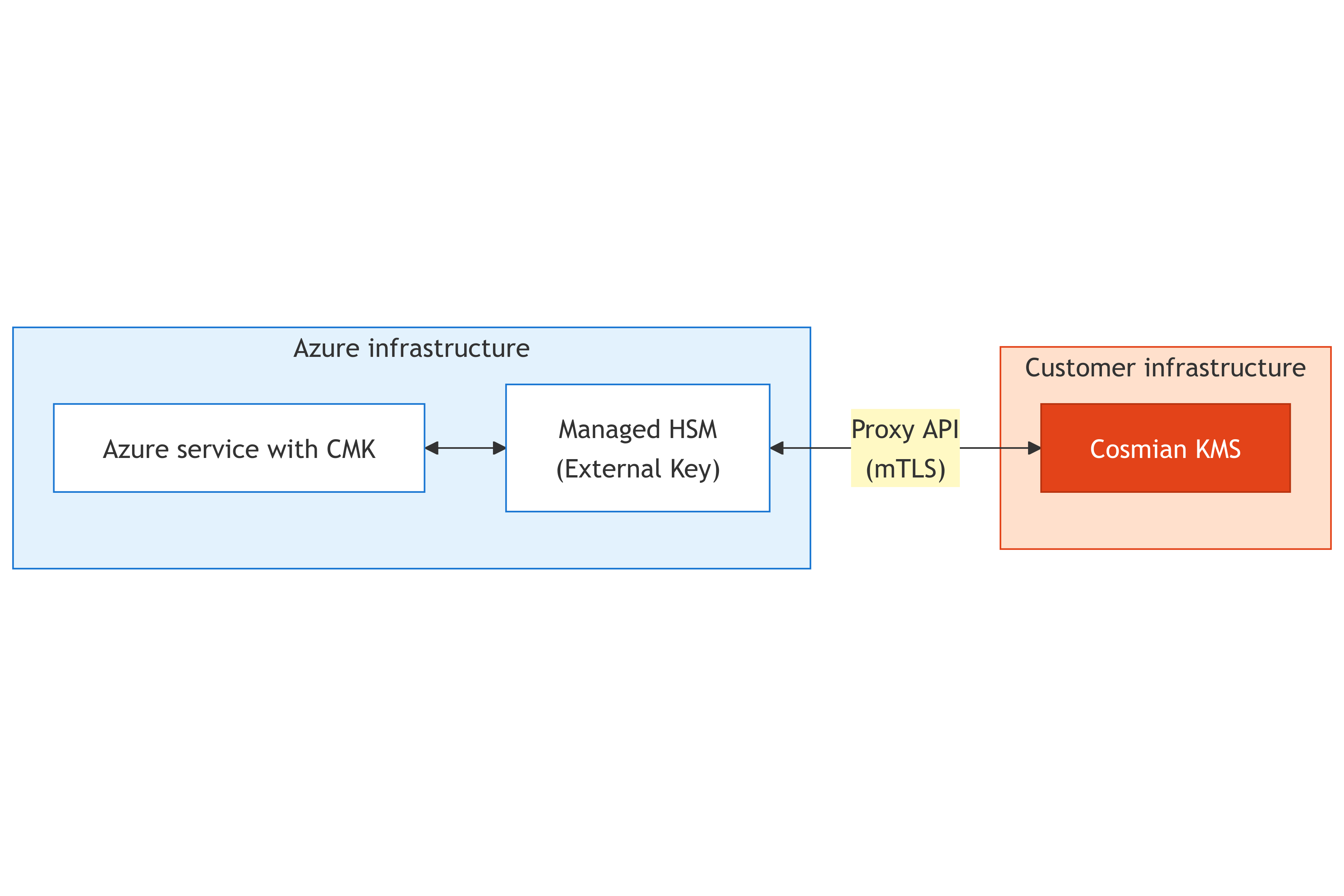
The customer's Azure services (configured with Customer Managed Keys) communicate with Azure Managed HSM to perform encryption/decryption operations. A full list of Azure services that support CMK can be consulted on this page.
With this integration, your protected secrets remain under your complete control while maintaining compatibility with Azure's managed services.
The following diagram illustrates a possible use case where Eviden KMS acts as the EKM Proxy :

Api specification
URL format
All requests and responses for Azure EKM APIs are sent as JSON objects over HTTPS. Each request includes context information to associate Azure Managed HSM logs and audits with Eviden KMS logs.
The URI format for EKM Proxy API calls is:
https://{public-KMS-URI}/azureekm/\[path-prefix]/{api-specific-paths}?api-version={client-api-version}
The parameters between brackets {} can be edited on the KMS configuration and must follow the following constraints :
Path Prefix:
- Maximum 64 characters
- Allowed characters: letters (a-z, A-Z), numbers (0-9), slashes (/), and dashes (-)
External Key ID:
- Referenced as
{key-name}in the endpoints below - Maximum 64 characters
- Allowed characters: letters (a-z, A-Z), numbers (0-9), and dashes (-)
Endpoints
| Endpoint | Method | Path | Description |
|---|---|---|---|
| Get Proxy Info | POST | /azureekm/[path-prefix]/info | Health check and proxy details |
| Get Key Metadata | POST | /azureekm/[path-prefix]/{key-name}/metadata | Retrieve key type, size, and supported operations |
| Wrap Key | POST | /azureekm/[path-prefix]/{key-name}/wrapkey | Wrap (encrypt) a DEK with a KEK |
| Unwrap Key | POST | /azureekm/[path-prefix]/{key-name}/unwrapkey | Unwrap (decrypt) a previously wrapped DEK |
Supported algorithms
| Algorithm | Key Type | Description |
|---|---|---|
| A256KW | AES-256 | AES Key Wrap (RFC 3394) |
| A256KWP | AES-256 | AES Key Wrap with Padding (RFC 5649) |
| RSA-OAEP-256 | RSA | RSA-OAEP using SHA-256 and MGF1 |
| RSA-OAEP | RSA | RSA-OAEP using SHA-1 and MGF1 |
⚠️ Notice: For RSA operations, always use the private key reference as
{key-name}in all endpoints, including wrap operations. The KMS will automatically derive and use the associated public key for encryption (wrap) operations. Passing the public key ID might lead to errors.
Getting started
Azure Managed HSM Setup
You must have an Azure Managed HSM Pool already created and activated in your Azure subscription. Refer to the Azure Managed HSM documentation for setup instructions.
Once the configuration is done, you will need the root CA certificate that the Azure Managed HSM uses for client authentication. This certificate will be configured in Eviden KMS to validate incoming mTLS connections.
Let's save the root CA as mhsm-root-ca.pem - We will need it in the next step.
Eviden KMS setup
Follow the Eviden KMS installation guide to install the KMS server on your infrastructure. The KMS server typically uses the configuration file located at /etc/cosmian/kms.toml when installed manually with default parameters.
Alternatively, you can deploy a pre-configured Eviden Confidential VM like explained in this guide.. For confidential VMs, the KMS configuration file is located in the encrypted LUKS container at /var/lib/cosmian_vm/data/app.conf.
Environment variables can also be used for all the configurations below.
The following guide will consider running Eviden KMS on confidential VM in non-FIPS mode.
mTLS Configuration
Configure mutual TLS authentication to accept connections from Azure Managed HSM by adding of editing to following lines in your configuration file: For detailed information about TLS client certificate authentication, see the TLS Client Certificate configuration guide.
[tls]
# Your server certificate and private key (PKCS#12 format)
tls_p12_file = "/etc/cosmian/server-cert.p12"
tls_p12_password = "your-secure-password"

# The certificate downloaded in the previous section
# This validates the client certificate presented by Azure MHSM
clients_ca_cert_file = "/etc/cosmian/mhsm-root-ca.pem"
Note : If you have a server's key and certificate files, you can convert them to PKCS#12 format using openssl:
openssl pkcs12 -export \
  -in server.crt \
  -inkey server.key \
  -out server-cert.p12 \
  -name "cosmian-kms-server" \
  -passout pass:your-secure-password
Azure EKM Configuration
[azure_ekm_config]
# Enable Azure EKM endpoints
azure_ekm_enable = true

# Optional: Path prefix for multi-tenant isolation (max 64 chars: a-z, A-Z, 0-9, /, -)
azure_ekm_path_prefix = "cosmian0"

# The fields below will be reported in the /info endpoint, edit according to your needs
azure_ekm_proxy_vendor = "Eviden"
azure_ekm_proxy_name = "EKM Proxy Service v0.1-preview"
azure_ekm_ekm_vendor = "Eviden"
azure_ekm_ekm_product = "Eviden KMS"

# WARNING: Only set to true for testing! Never in production.
azure_ekm_disable_client_auth = false
Configuration Parameters:
| Parameter | Type | Default | Description |
|---|---|---|---|
azure_ekm_enable | boolean | false | Enable/disable Azure EKM API endpoints. |
azure_ekm_path_prefix | string | none | Optional path prefix for routing and multi-tenant isolation. Max 64 chars: a-z, A-Z, 0-9, /, -. Example: "cosmian0", "customer-a/prod" |
azure_ekm_proxy_vendor | string | "Eviden" | Proxy vendor name reported in /info endpoint. |
azure_ekm_proxy_name | string | "EKM Proxy Service" | Proxy name and version reported in /info endpoint. Auto-inserts the KMS package version by default. |
azure_ekm_ekm_vendor | string | "Eviden" | EKMS vendor name reported in /info endpoint. |
azure_ekm_ekm_product | string | "Eviden KMS v{CARGO_PKG_VERSION}" | EKMS product name and version reported in /info endpoint. |
azure_ekm_disable_client_auth | boolean | false | ⚠️ Bypasses mTLS authentication. Only use for testing. |
Grant the Managed HSM identity access rights on the KMS
When Azure Managed HSM connects to the EKM proxy over mTLS, Eviden KMS authenticates it as a regular KMIP user, using the Subject CN of the client certificate as the username (see TLS Client Certificate configuration and the Authentication guide). This identity is generally of the form <hsm-name>.managedhsmclient.azure.net — check your own Managed HSM client certificate to confirm its exact Subject CN.
Because the external key is owned by whichever KMS user created it, you must explicitly grant this Managed HSM identity the rights to read and use that key, using ckms access-rights grant:
ckms access-rights grant <hsm-name>.managedhsmclient.azure.net -i <kms-key-uid> get get_attributes encrypt decrypt
Without this step, Azure's key registration call (see below) fails with a KeyNotFound-type error, because the KMS rejects the Managed HSM identity's request for an object it does not own and has not been granted access to.
Connect Azure Managed HSM to the EKM proxy
The following az keyvault ekm-connection commands configure the Managed HSM side of the connection to your Eviden KMS.
First, create the EKM connection on the Managed HSM, pointing it at your Eviden KMS:
az keyvault ekm-connection create \
  --hsm-name <hsm-name> \
  --host <kms-fqdn>:443 \
  --path-prefix /azureekm/<azure_ekm_path_prefix> \
  --server-ca-certificate <path-to-kms-tls-ca-or-server-cert.pem>
⚠️ Port 443 is required. The
--hostargument's own help text states: "EKM proxy host (FQDN or FQDN:port). If port is omitted, 443 is assumed." In practice, the Managed HSM EKM proxy calls have been observed to require port 443 — make sure your Eviden KMS is reachable on port 443 (in addition to any other port you use for KMIP/administrative access), even if[http] portin your KMS configuration is set to a different value.
--path-prefixmust matchazure_ekm_path_prefix. If you configuredazure_ekm_path_prefix = "cosmian0"on the KMS side, the Azure-side--path-prefixmust be the corresponding path (e.g./azureekm/cosmian0). A mismatch here causes requests to fail to route, without necessarily producing an obvious error on the Azure side.
Verify the connection:
az keyvault ekm-connection check --hsm-name <hsm-name>
A successful check returns the /info payload reported by the KMS (apiVersion, proxyVendor, proxyName, ekmVendor, ekmProduct).
Register the external key and grant Azure RBAC
Register the KMS key as an external Managed HSM key, referencing its KMS UID:
az keyvault key create \
  --hsm-name <hsm-name> \
  --name <azure-key-name> \
  --external-key-id <kms-key-uid>
The consuming Azure service (for example, a Storage account's managed identity) then needs the Managed HSM Crypto Service Encryption User role (built-in Managed HSM local RBAC role, which grants the keys/wrap, keys/unwrap, and keys/read data actions) on that key:
az keyvault role assignment create \
  --hsm-name <hsm-name> \
  --role "Managed HSM Crypto Service Encryption User" \
  --assignee <consuming-service-principal-id> \
  --scope /keys/<azure-key-name>
Testing the integration
For testing purposes or for debugging, you can temporarily disable client authentication by commenting out the following configuration fields:
[tls]
# Comment this field to disable client auth and allow incoming requests from anyone
# clients_ca_cert_file = "/etc/cosmian/mhsm-root-ca.pem"

[azure_ekm_config]
# Set to true to bypass mTLS for local testing only — NEVER use in production
azure_ekm_disable_client_auth = true
Restart the KMS server:
sudo systemctl restart cosmian-kms
Test the /info endpoint:
curl -X POST "https://ekm.yourdomain.com/azureekm/cosmian0/info?api-version=0.1-preview" \
  -H "Content-Type: application/json" \
  -d '{
    "request_context": {
      "request_id": "test-request-123",
      "correlation_id": "test-correlation-456",
      "pool_name": "test-pool"
    }
  }'
Expected response (if you used the config above):
{
  "api_version": "0.1-preview",
  "proxy_vendor": "Eviden",
  "proxy_name": "EKM Proxy Service v=0.1-preview",
  "ekm_vendor": "Eviden",
  "ekm_product": "Eviden KMS v5.15.0"
}
Troubleshooting
| Symptom | Likely cause | Fix |
|---|---|---|
az keyvault ekm-connection create succeeds, but Azure later fails to reach the proxy | KMS not reachable on port 443 | Expose the KMS on port 443, in addition to any other configured port — see the port 443 note above. |
| Requests never reach the KMS logs, or Azure reports a connectivity/routing error | --path-prefix used in az keyvault ekm-connection create does not match azure_ekm_path_prefix in the KMS configuration | Make both values match exactly, including the /azureekm/ prefix. |
az keyvault key create --external-key-id ... fails with a KeyNotFound-type error | The Managed HSM's mTLS identity has not been granted access rights on the KMS key | Grant get, get_attributes, encrypt, decrypt to the Managed HSM identity with ckms access-rights grant — see above. |
| Wrap/unwrap fails during a CMK-enabling operation (for example Azure Storage CMK) with a generic error on the Azure side | The client sent a wrapping algorithm not currently listed under Supported algorithms | Check the KMS server logs for the exact alg value received, and confirm it is one of the algorithms in the table above. |